Order allow,deny Deny from all download Archives • Hacks for Data Analysis

download

Automatically Unmerge Cells in Excel

Unmerge Cells in Excel

How to Automatically Unmerge Cells in Excel

Searching ways to Automatically Unmerge Cells in Excel? In this post I’ll show you a free Excel tool that will Unmerge all the cells and fill the blanks with values to help you analyze your data!

Free Download

Download now for free our Excel Tool used in the video below:

Unmerge Cells in Excel Automatically

Watch this video and learn how to use our tool to Unmerge all the cells automatically:

How does the tool work:

The tool allows you to quickly Unmerge all cells in Excel and fill the blanks with values after two simple steps:

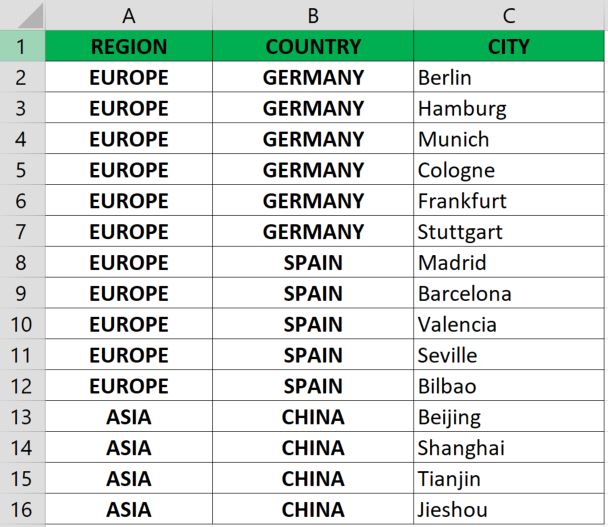
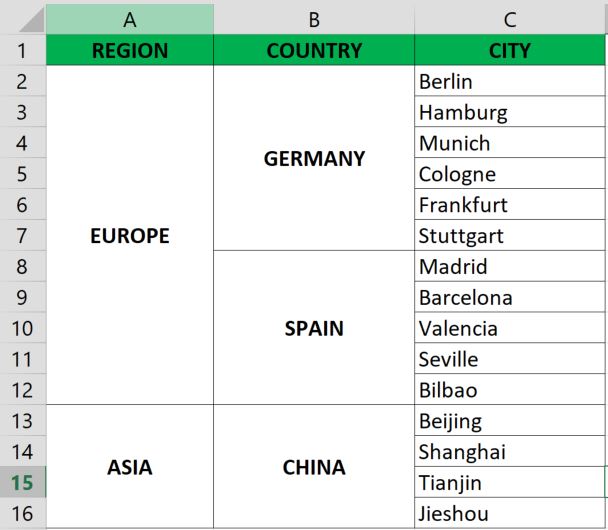
Merged Cells in Table before
Step 1: Paste the merged table into the tool
Run button to Unmerge and fill all cells
Step 2: Press the 'Run' button
Unmerged Cells in Table before
Your table has now been unmerged and the blanks filled with the correct cell values!

How to do VLOOKUP in Power BI

How to do VLOOKUP in Power BI

How to do VLOOKUP in Power BI

Searching how to do VLOOKUP in Power BI? In this post I’ll show you how to use the Merge Queries function from Power BI to achieve this!

Free Power BI Template Download

Download now for free our Power BI template used in the video below:

Merging Queries in Power BI

Watch this video and learn how to do VLOOKUP in Power BI using the Merge Queries functionality:

How does the 'Merge Queries' work:

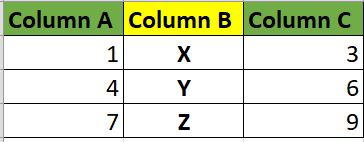
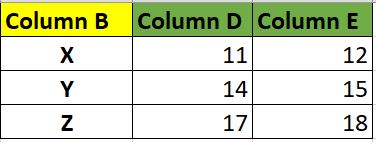
The Merge tables functionality from Power BI allows you to select common columns between 2 or more different tables, creating one single “Merged” table based on the selected column.

Table 1
Table 1
Table 2
Table 2
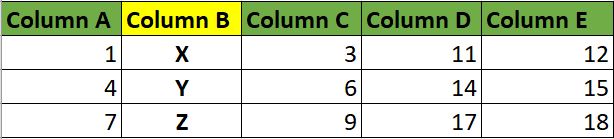
Merge Tables in Power BI
Table 3 = Table 1 merged with Table 2 by common 'Column B'

Easier than Excel's VLOOKUP!

Power BI’s Merge Queries is fairly easy to use, and with just a few clicks in the tool, allows you to extract multiple columns from multiple queries to one single query.

The Merge Queries in more details

You can find here more details on Microsoft’s webpage on the Merge Queries from Power Query which is available in Power BI.

Group By RANGE: 2 Ways To Group DATA in Power BI

Free Template to create your data group by range in Power BI

Group by range of values in Power BI

Searching how to classify data or group by range of values in Power BI? Try these tips and start grouping your DATA now.

Free Power BI Template Download

Create your own data group by range of values

Watch this video and learn 2 Ways to Group DATA in Power BI by using visuals or DAX formula:

You can use this approach to

The 2 Ways in more details

You can find here Microsoft’s documentation on user grouping and binning for more details on the first method from the video. For the second method, you can find here in details more information on the conditional “IF” DAX function.

Download it now for free

MET Tool

FREE EMAIL MARKETING TOOL IN EXCEL

Send multiple emails at once from Excel

Searching how to send multiple emails at once? Try this FREE email tool made in Excel and send hundreds of custom emails in just seconds!

Free Download: MET (Massive Email Tool)

Download now for FREE this email tool built in Excel and you will be able to send customized emails to several recipients in Outlook, and even add personalized attachments!

How to use it

Watch this video and learn how you can use today the Massive Email Tool to send multiple emails at once:

What can you do with the MET tool

What can you use it for

Some applications for this tool may be:

Paste your distribution list into this tool and create in just a few seconds customized emails targeted to your audience.

Include multiple, different and customized attachments to each email very quickly.

Sending individual emails to multiple recipients is an easy task tith the Massive Email Tool!

The options are endless!

The MET tool is very dynamic, so just be creative and find new ways of using this tool that can speed up your day-to-day work!

Download it now for free